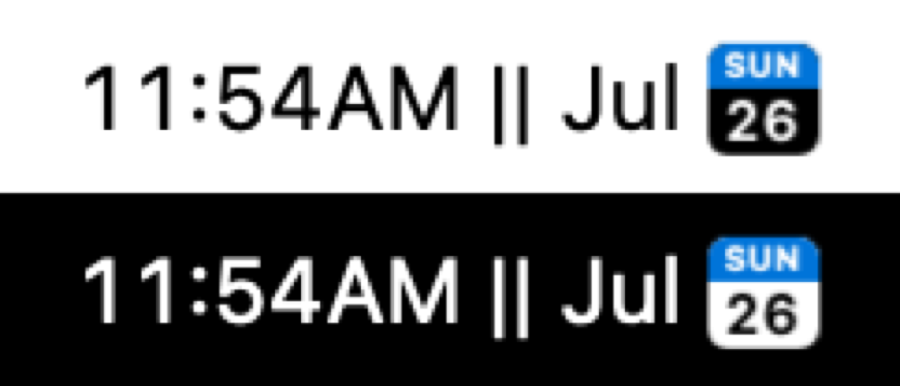
- Atlanta11:54AM
- Cupertino8:54AM
- London4:54PM
- Tokyo12:54AM
Your clock, your format.
World clocks, a calendar mark drawn in code, a month grid and your events.
The menu bar manager for Mac
Keep what you need on the Main Stage beside the notch. Everything else waits behind the curtain, one click or swipe away, and the bar rearranges itself for your display and the app in front.
$29 once, no subscription. macOS 15 or later, Apple silicon.
Built-in Retina Display21 icons

Twenty-one icons, and the notch swallows the overflow.
Click the gold chevron to bring Row 1 forward.
On a MacBook with a notch, a full bar runs out of room fast. StageMenu decides who gets a seat.
Twenty-one icons. The notch takes the rest.
The curtain closes on Row 1.
Six on the Main Stage, all in reach.
Three seats
Arrange your bar once. StageMenu remembers the order you drag, puts it back after a restart, and restores it from one menu item: Restore my layout.
In your menu bar, the readouts and controls you reach for all day.
Hidden with the curtain closed, brought forward under the bar on a click or swipe.
Behind the second divider, for the icons you never want in a reveal.
Personas
Pick a persona and StageMenu arranges the real bar for you, grouping icons by what you check at a glance. Your own order stays one tap away.
Date, time and power in the top-right corner, then connection and anything recording or listening. On the laptop screen, only what fits beside the notch.
8 on stage · 13 behind the curtain

Every screen
The laptop alone keeps the essentials beside the notch. Dock it to a monitor and the full bar takes its seats, automatically. With an Epiphani account your plan follows you to your other Macs, and each Mac keeps its own screen positions.
Built-in Retina DisplayPlan 1
Built-in Retina Display + Studio DisplayPlan 2
Rules
Rules follow the app in front, your power, the hour, the Wi-Fi network you are on and the moment you present. The Rules menu shows what is in force right now and why, and puts everything back when the moment passes.
Designed panels
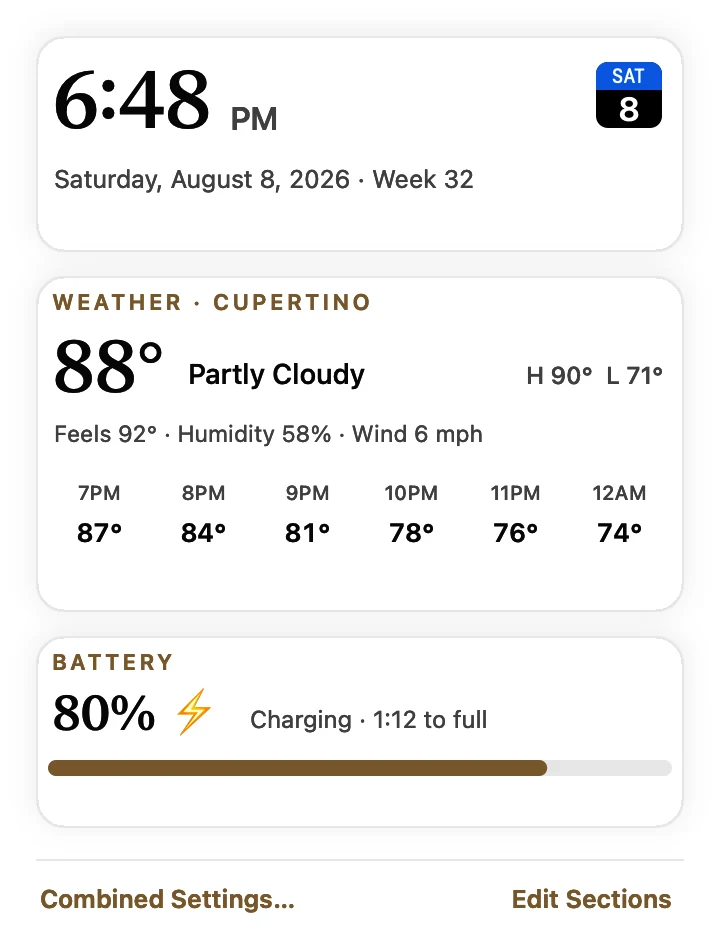
Click a readout and a real panel drops down: editorial type, gold section labels, and the details that matter, one click from anywhere.
Readouts
The readouts you glance at all day live in StageMenu itself, so they take their seats with everything else.
World clocks, a calendar mark drawn in code, a month grid and your events.
National Weather Service in the US, Apple WeatherKit everywhere else.
Your Mac, AirPods, mice, keyboards, and wireless mics drawn as a clip-on pod.
Five styles in the bar, and a panel that connects or disconnects a device.
The network you are on by name, with Personal Hotspot one click away.
CPU, memory, disk and network, sampled natively in Swift.
The mode your Mac is in now, plus its battery and charger settings.
A warning when your Mac is plugged in and still losing power.
For agents
StageMenu ships a Model Context Protocol (MCP) server with eleven tools, so an assistant can read the bar, arrange it, write rules from sentences and connect a Bluetooth device by name.
Proof
Each part of StageMenu ships a self-test with negative controls, and a failure stops the build.
rule checks, 72 of them negative controls, so only a sentence it understands becomes a rule.
agent server checks, 23 of them negative controls, across all eleven tools.
menu bar icons across 27 apps, read on a live Mac by the icon census.
| StageMenu | iStat Menus | Bartender | Stats | Ice | |
|---|---|---|---|---|---|
| Readouts and icon hiding in one app | Yes | Readouts only | Hiding only | Readouts only | Hiding only |
| Rules written as sentences | Yes | Threshold alerts | Triggers, as checkboxes | No | No dynamic rules |
| Explains its own decisions | Yes, in the Rules menu | No | No | No | No |
| MCP server for AI agents | Yes, eleven tools | No | No | No | No |
| Weather without a separate subscription | Yes | Subscription for the data | Not applicable | No weather | No weather |
| Actively developed | Yes | Yes | Yes | Yes | No code push since September 2025 |
Read from each maker's own page in July 2026 and linked above. Prices: iStat Menus $11.99 to $14.99 once plus a weather subscription; Bartender $24 once plus $15 a year for Pro; Stats and Ice are free. The full account of every capability is on the capabilities page.
One price
$29once
No subscription. macOS 15 or later, Apple silicon.
Sign in with an Epiphani account and your layout and settings follow you to your other Macs.
Questions
No. Hiding and revealing needs no permission at all. On macOS 15 and 26 StageMenu's divider pushes Row 1 off the bar; on macOS 27 it uses the menu bar's own concealment. Accessibility is asked for, in context, only when you open the list of every app's icons.
Apple silicon Macs on macOS 15, 26 and 27. StageMenu picks the hiding method that fits the system it is running on, and Settings > General lets you keep it in the menu bar or in the Dock only.
Because the two halves can finally work together. StageMenu stages your icons, draws its own readouts for clock, weather, battery, Wi-Fi, Bluetooth and system load, and runs rules that move both at once, for $29 once.
Write a sentence such as "Hide everything when I'm presenting". StageMenu turns it into a rule with a condition and an action. While the condition holds, the Rules menu shows Right now and the reason; when it ends, StageMenu puts back what it changed.
StageMenu ships a Model Context Protocol server with eleven tools over JSON-RPC on standard input and output. An assistant can read the bar, show or hide a module, collapse the icons, place the divider, add rules from sentences and connect a Bluetooth device by name.
Yes. $29 once, no subscription, with every readout, the rules and the agent server included. StageMenu downloads directly from stagemenu.com, signed with an Apple Developer ID and notarized by Apple.
Its icon gets a seat on the Main Stage for its first day, so you see it and can try it. Drag it into Row 1 or Row 2 whenever you like, and StageMenu remembers where you put it.
StageMenu for macOS 15 or later on Apple silicon. $29 once, no subscription.